Wednesday, January 6, 2010

 CLICK HERE TO DOWNLOAD ( 70 KB )
Monday, January 4, 2010
Farmville Free Cows!
There is a currently a glitch in Farmville that gives you free cows. You will need at least one Cow (any kind) in your gift box and 10,000 coins to purchase a required Dairy Farm. Who knows how long this will last or when it will be fixed so take advantage while you can!
- Purchase a Dairy Farm in the Farmville Market.
- Place Cow from your gift box directly to Dairy Farm. Do not place the Cow down anywhere else on your farm.
- Return to giftbox and there should still be another Cow.
- Repeat until you have the amount of desire cows or until you run out of room on your farm

Turkeys grow from baby Turkeys
If a lost animal wanders onto your farm, you have the option to 'Help' the animal or to simply 'Ignore' it.
If you click 'help' a post appears on your Facebook wall. Your friends and neighbors can click on the link to adopt the animal. This is the only way to get many of the best yielding animals.
If you click 'help' a post appears on your Facebook wall. Your friends and neighbors can click on the link to adopt the animal. This is the only way to get many of the best yielding animals.

Turkeys grow from baby Turkeys in three days and are very profitable.
Wednesday, December 9, 2009
facebook RC3 browser - Windows 7


Some Key Features of this program
No-Cookies
No-Web History
No-ADS
NO-Anything which make your web trip SLOW
Yes-Stability
Yes-Speed
yes-Safety
Yes-Virus Protection
No-Web History
No-ADS
NO-Anything which make your web trip SLOW
Yes-Stability
Yes-Speed
yes-Safety
Yes-Virus Protection
Download Facebooker RC3 from the following links
Sunday, November 22, 2009
How to Appear Invisible in Facebook Chat?
How to Appear Invisible in Facebook Chat?
If you don’t have the mood to chat on Facebook or don’t want to be bothered with chat messages from your Facebook buddies at a particular time, you can choose to appear offline on Facebook Chat by simply selecting the “Go Offline” option.
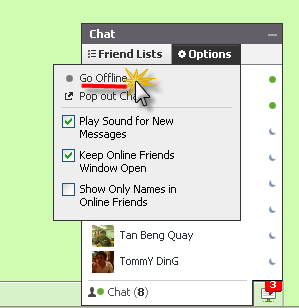
In the “Go Offline” mode, the Facebook Chat is completely turned off where you have no idea which of your friends are currently online. If you want to find out who’s online, you need to turn on Facebook Chat. How’s good it will be if we can have “Invisible” mode in Facebook Chat where you can see which of your friends are online without turning on Facebook Chat.
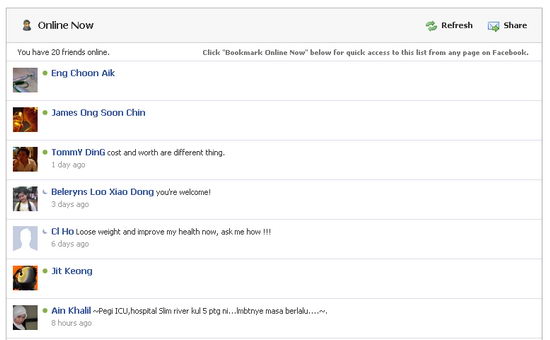
Well, there is actually a Facebook application that allows you to appear invisible in Facebook Chat. You just need to install Online Now Facebook application and have your Facebook Chat turned off, then go to Online Now application page to find out who’s online. Make sure you bookmark Online Now for quick access to the Facebook Chat’s online list.
Run Facebook Chat Directly from Your Desktop
Run Facebook Chat Directly from Your Desktop
Do you love to chat with your family and friends on Facebook? And how would you like to use the Facebook chat without even have to fire up your web browser?
Gabtastik is a Site Specific Browser (SSB) for web chat services that allows you to chat with your Facebook friends directly from your desktop. Not only Facebook chat, this desktop application also supports Google Talk.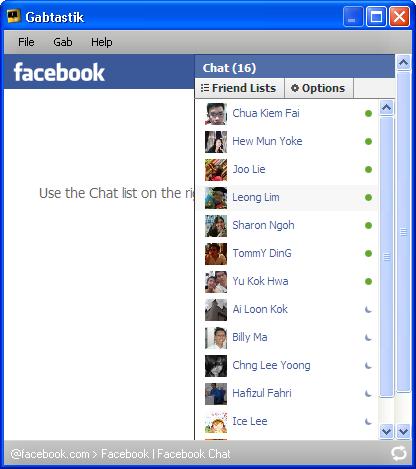
This freeware lets you keep chat sessions open on your Windows desktop outside of your regular web browser, using minimal screen real estate and system memory.
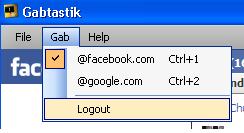
Gabtastik also lets you specify window display level and window opacity, and lets you toggle quickly (under the Gab option) between Facebook Chat and Google Talk chat services.
Gabtastik runs well on Windows XP and Vista. Also available for Mac OS X
Download Gabtastik
Subscribe to:
Posts (Atom)