Wednesday, February 17, 2010

iBin – Recover files using Recycle Bin in USB Flash drive


By default, a file deleted from USB drive will permanently and is not stored in Windows recycle bin. Windows Recycle bin is useful for storing and recovering deleted files from the local hard disk. iBin is a new Portable Recycle Bin that makes it easier to recover any deleted files and works a bit similar to the default Windows recycle bin. This is designed to work on all versions of Windows OS including Vista / 7.

iBin interface
iBin will use the above interface for any deletions from Flash drive and will occupy certain amount of predefined space in same Flash drive, so this is ideal for people with large USB Flash drive who want to have the option of recovering data quickly without any recovery tools

Related Posts


Saturday, February 13, 2010

Rar Password Cracker 100% sucessfully works

Rar Password Cracker 100% Successfully 

Download:
http://hotfile.com/dl/28385333/2b4f9bb/crackpassrarsuccess.rar.html

Related Posts


GetDataBack 4.0 | 5.5 MB (Recover your deleted Files,folders)

GetDataBack 4.0 | 5.5 MB

GetDataBack 4.0 | 5.5 MB


GetDataBack is highly advanced data-recovery software that will help you to get your data back when your drive's partition table, boot record, Master File Table, or root directory is corrupted or lost, when a virus hits the drive, when files have been deleted, when the drive has been formatted, or when the drive has been struck by a power failure. GetDataBack can even recover your data when the drive is no longer recognized by the operating system or not only the root directory but all directory information is lost.

Download

http://hotfile.com/dl/28393747/37b947d/ss.rar.html

Related Posts


Thursday, February 11, 2010

LookInMyPC - Complete PC Profiling, Audit, and Diagnostic Report Utility

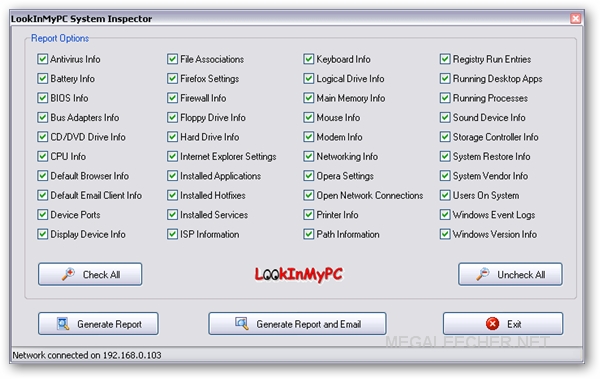
Having comprehensive computer information is crucial for troubleshooting problems, and if you are looking for one such free tool on Windows platform LookInMyPC takes care of this by providing a complete and comprehensive system profile with all the information of installed hardware and software. Additionally it provides system diagnostic information such as details on running processes, installed services, startup programs, Windows updates and hot fixes, active network and Internet connections, TCP/IP port usage, event log detail, and much more.

Complete PC Profiling and Diagnostic Reports
LookInMyPC utilizes a single, easy to use screen allowing users to select items of interest for inclusion in the report, the report is nicely formatted making it easier to read and can be viewed and printed from any web browser with hyperlinks to quickly "Google" them for more information - One of the most useful feature of this utility is the ability to "Generate report and Email" which creates a full system profile and diagnostic report and automatically sends it as an email ZIP file-attachment to user supplied email address.

Download

Related Posts


Monday, December 21, 2009

TeraCopy Pro 1.22


Copy your files faster and easier

TeraCopy is a compact program designed to copy and move files at the maximum possible speed, providing the user a lot of features:

* Copy files faster. TeraCopy uses dynamically adjusted buffers to reduce seek times. Asynchronous copy speeds up file transfer between two physical hard drives.
* Pause and resume file transfers. Pause copy process at any time to free up system resources and continue with a single click.
* Error recovery. In case of copy error, TeraCopy will try several times and in the worse case just skips the file, not terminating the entire transfer.
* Interactive file list. TeraCopy shows failed file transfers and lets you fix the problem and recopy only problem files.
* Shell integration. TeraCopy can completely replace Explorer copy and move functions, allowing you work with files as usual.
* Full Unicode support.
In short, this program will replace windows' traditional copy routine into this amazing program, which allow you to copy anything MUCH faster.
Try and you'll love it!

Enter key at
Menu -> About -> Enter Key


Download Mirrors


Rapidshare Megaupload Mediafire


Note: Teracopy is 90%  faster than Windows Copy file System


Related Posts


Wednesday, December 9, 2009

Install Multiple Software with Ninite


Ninite is a great web service that allows you to create a customized installer for multiple freeware applications. By creating just a single installer, you can install dozens of your favourite applications in one go.

To create the installer, first you need to pick the applications that you want to include in your installer from Ninite main site. You can choose from 60 choices of software from categories like web browsers, messaging tool, media players, photo editors and more. All the applications are of latest versions.

Ninite runs on Windows XP, Vista and 7. Alternatively, you can try Smart Installer Pack.

Related Posts


Sunday, November 22, 2009

TUNEUP UTILITES 2010 !!!!! Incl. Serial


Description: With TuneUp Utilities, your system will be faster, more comfortable and more secure. All important aspects of systemconfiguration, security, cleanup and maintenance can be accessed through a modern graphical interface. TuneUp Utilities will optimize the performance of your PC, solve problems and help you easily customize your computer to suit your needs. TuneUp Utilities helps both beginners and experts to make Windows meet their needs in a way that is better, easier and safer. All important system options are explained in an easy way and can be turned on or off at the click of your mouse. TuneUp Utilities will then make the necessary changes in the registry or boot files automatically. We place a high value on system stability, so that Windows won’t stop working reliably. And most changes that you make can be undone in TuneUp Rescue Center – easily and safely.
Release Name: TuneUP.Utilities.2010.Incl.Serial.WinAll-iND
Size: 20.21 MB


Related Posts


TeraCopy – Fastest File and Folder Copying !!! (TestEd)

I have tested tera copy on my system. it copies so speed than the windows copying system.So, i recommended u to try once ..

eraCopy is a compact program designed to copy and move files at the maximum possible speed, providing the user a lot of features:
Copy files faster. TeraCopy uses dynamically adjusted buffers to reduce seek times. Asynchronous copy speeds up file transfer between two physical hard drives.
Pause and resume file transfers. Pause copy process at any time to free up system resources and continue with a single click.
Error recovery. In case of copy error, TeraCopy will try several times and in the worse case just skips the file, not terminating the entire transfer.
Interactive file list. TeraCopy shows failed file transfers and lets you fix the problem and recopy only problem files.
Shell integration. TeraCopy can completely replace Explorer copy and move functions, allowing you work with files as usual.
Full Unicode support.
Windows 7 x64 support
.

Related Posts


Saturday, November 21, 2009

Add Background images to Windows Xp !!!

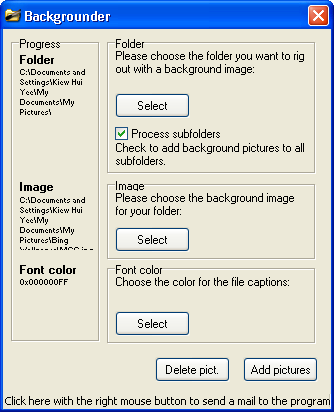
To use Backgrounder, first unzip all files in Backgrounder.exe to your preferred directory. Then, launch the application. No installation is required.

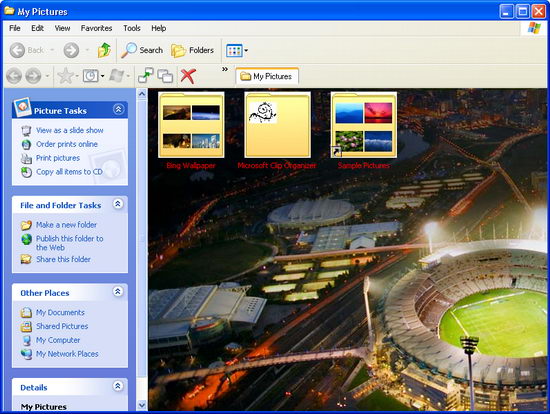
From the main window, browse for folder that you want dress up with background image. Backgrounder allows batch folder customization. By checking the “Process subfolders” option, your background image will be added to all (or a selection ) subfolders.
Backgrounder Add Background Image to Window Folder
Then, select the image for that folder. The supported image formats are JPEG and Bitmap (BMP). Finally, decide the colour of the file captions in the folder and click “Add pictures” button. Done!
Add Background Image to Window Folder
To remove the background image, use the “Delete pict” button.
Backgrounder is a freeware and works only on Windows XP. Other than Backgrounder, Windowpaper XP is another good alternative. It has more features like real-time preview window and allows you to change folder background by right-clicking the folder.
Download Backgrounder

Related Posts